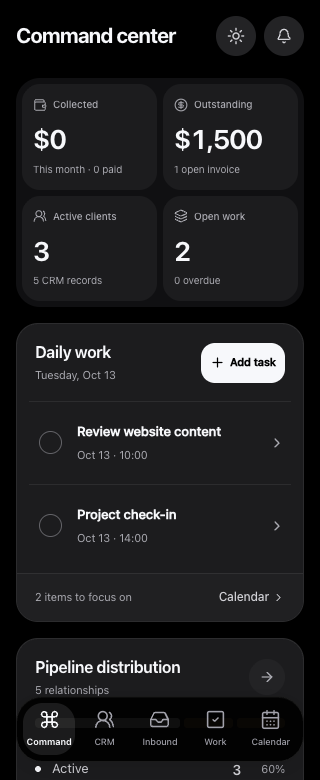
Mission Control is the private operations system behind araNET. The design brings client and project context into a workspace that can be read on a phone, not just managed from a desk. The public dashboard image comes from an isolated local fixture with sample data.
An incoming enquiry is not an accepted client. That distinction matters before any interface detail: who needs a response, what has been agreed and which work belongs to an active relationship? The mobile direction starts with a readable profile and keeps the relevant work nearby.
A relationship has more than one stage.
01
Receive the enquiry
Keep the initial request distinct from a client relationship and the work that may follow.
02
Understand the context
Bring the person, project and next action into a readable mobile view.
03
Continue in the workspace
Organize the client direction around overview, work, invoices, documents and media.
Inside the decisions.
Design for the check between tasks.
A phone view needs a clear order of information. The sample dashboard puts summary context and daily work into a narrow layout, with navigation at the bottom. The profile direction follows the same principle: recognize the person and the next task before opening an edit form.
Keep related work in context.
A client profile should not be a dead end with a name and a phone number. The workspace direction connects the overview with work, invoices, documents and media. The aim is to keep the relationship understandable as someone moves between the parts of a project.
Separate the portfolio from the private system.
The public example uses an isolated fixture, not a customer account. That lets the story explain the mobile direction without exposing contacts, financial records or private project details. Mission Control remains an internal tool, with no public signup implied by the preview.
The next action should be easy to find.
A useful internal view lets someone recognize the relationship, read the work and find the next action without losing context. Mission Control remains private; the sample dashboard is a way to share the thinking behind its mobile direction.